How to Alphabetize MLA Works Cited Entries
Learn how to alphabetize MLA Works Cited entries correctly. Letter-by-letter sorting rules for identical authors, group authors, and titles starting with numbers.
Your research is finished. Your citations look ready. Now they need the right order. Alphabetizing feels easy until two authors share a surname or a source has no author at all. This guide explains how to alphabetize MLA Works Cited entries step by step. You’ll tackle tricky cases, spot hidden errors, and finish with a clean, professional page.
What Does Alphabetical Order Mean in an MLA Works Cited Page?
MLA sorts each entry by its first word. Usually, that’s the author’s last name. When there’s no author, it’s the first main word of the title. This is the foundation of MLA Works Cited alphabetization.
MLA sorts letter by letter. It ignores spaces, punctuation, and accent marks while sorting. So think of each name as one continuous string of letters. This keeps your Works Cited order consistent and easy to scan.
How Should You Arrange Entries With Different Author Names?
Sort by author surname first. If two surnames match, move to the first name. So “Garcia, Ana” comes before “Garcia, Luis.”
Here’s a quick look at author alphabetical order in action:
| Entry Begins With | Where It Goes |
|---|---|
| Adams, Kate | First |
| Garcia, Ana | Second |
| Garcia, Luis | Third |
| ”History of Maps.” | Fourth |
| Kim, Daniel | Fifth |
Notice how the untitled-author entry slides right in. That’s how to alphabetize sources by author MLA style.
What Happens When Several Works Have the Same Author?
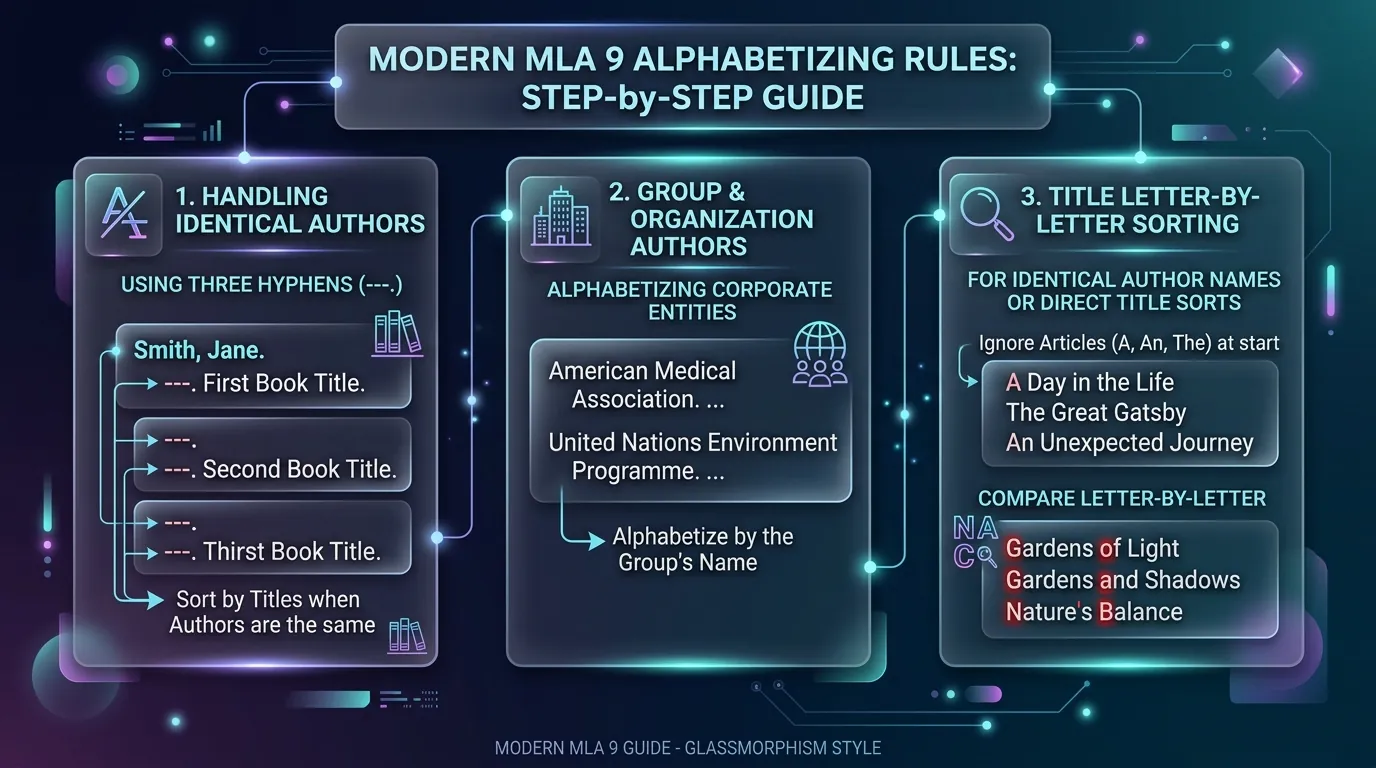
Write the author’s name only in the first entry. For each following work, replace the name with three hyphens and a period. Then order those works by title.
For example, “Adams, Kate. Coastal Towns.” comes first. Next comes ”---. River Cities.” This answers what to do if two MLA sources have the same author. It keeps multiple works by the same author tidy.
How to Alphabetize Identical Authors With Co-Authors
Solo works by an author come first. Then list works that author wrote with others. Sort those by the co-author’s last name. The three hyphens only replace names that match exactly. This rule helps you alphabetize identical authors without mixing entries.
How Do You Alphabetize Sources With No Named Author?
Use the title as your sorting word. However, skip “A,” “An,” and “The” at the start. So “The Ocean Guide” sorts under “O,” not “T.”
Place that entry where its word belongs. Don’t dump anonymous sources at the bottom of the list. This is how to alphabetize MLA sources with no author. It keeps the page natural and easy to follow.
What Role Do Titles Play When Authors Are Identical or Missing?
Titles act as tiebreakers. When one author wrote several works, titles decide their order. When no author exists, the title leads the entry.
In both cases, ignore opening articles. That applies to book titles, article titles, and website titles alike. Quotation marks and italics don’t matter either. Following this rule helps you sort MLA titles alphabetically without second-guessing.
How Should Organizations and Group Authors Be Ordered?
Sort group authors by their full official name. For instance, “American Heart Association” goes under “A.” Drop any opening “The” when sorting.
There’s one twist. If the organization is also the publisher, MLA says to skip the author slot. Start with the title instead, and sort by that title. This is how to order group authors in MLA correctly.
What Happens When Two Works Begin With Similar Names or Titles?
Compare them letter by letter until they differ. “Newman” comes before “Newton.” “Sea Levels” comes before “Seasons,” because MLA ignores the space.
Case study: Picture a junior sorting “McDonald” and “MacArthur.” At first, she files both under “Mc.” Then she checks each letter. “MacArthur” wins because “a” comes before “c.” Careful comparison handles similar source titles and same-name authors smoothly.
How Can You Handle Numbers, Initials, and Unusual Characters in Source Names?
MLA treats numbers as if they were spelled out. So “5 Ways to Save Water” sorts under “F” for “five.” This settles most questions about titles beginning with numbers.
For initials in author names, sort by the letters as they appear. Ignore apostrophes, hyphens, and periods. Treat accented letters like plain ones. These MLA sorting conventions clear up nearly every odd case.
Sorting Punctuation in Titles for MLA
Question marks, dashes, and quotation marks don’t change the order. So “Why?” and “Why Oceans Rise” sort by letters alone. Ignoring punctuation in titles keeps your list steady and predictable.
What Alphabetizing Mistakes Can Remain Hidden After Automatic Formatting?
Word processors sort by raw characters, not MLA rules. So “The Ocean Guide” lands under “T.” Titles starting with numerals jump to the top. These are sneaky alphabetization mistakes.
Citation tools add their own problems. Some repeat author names instead of using hyphens. Others place co-authored works in the wrong spot. Because the list still looks neat, errors slip by. Always read it yourself to fix Works Cited order properly.
Conclusion
A well-ordered Works Cited page shows real care. Sort by surname first, then by first name. Skip “A,” “An,” and “The” in titles, and treat numbers as words. Use three hyphens for repeated authors, and don’t trust automatic sorting blindly. Finally, confirm the hanging indent and double spacing. These habits help you check alphabetical order in MLA and correctly order Works Cited entries every single time.