MLA Citation Generators Compared: 5 Tools Tested
We tested 5 popular MLA citation generators on tricky academic sources. Compare accuracy, handling of metadata gaps, and MLA 9 compliance.
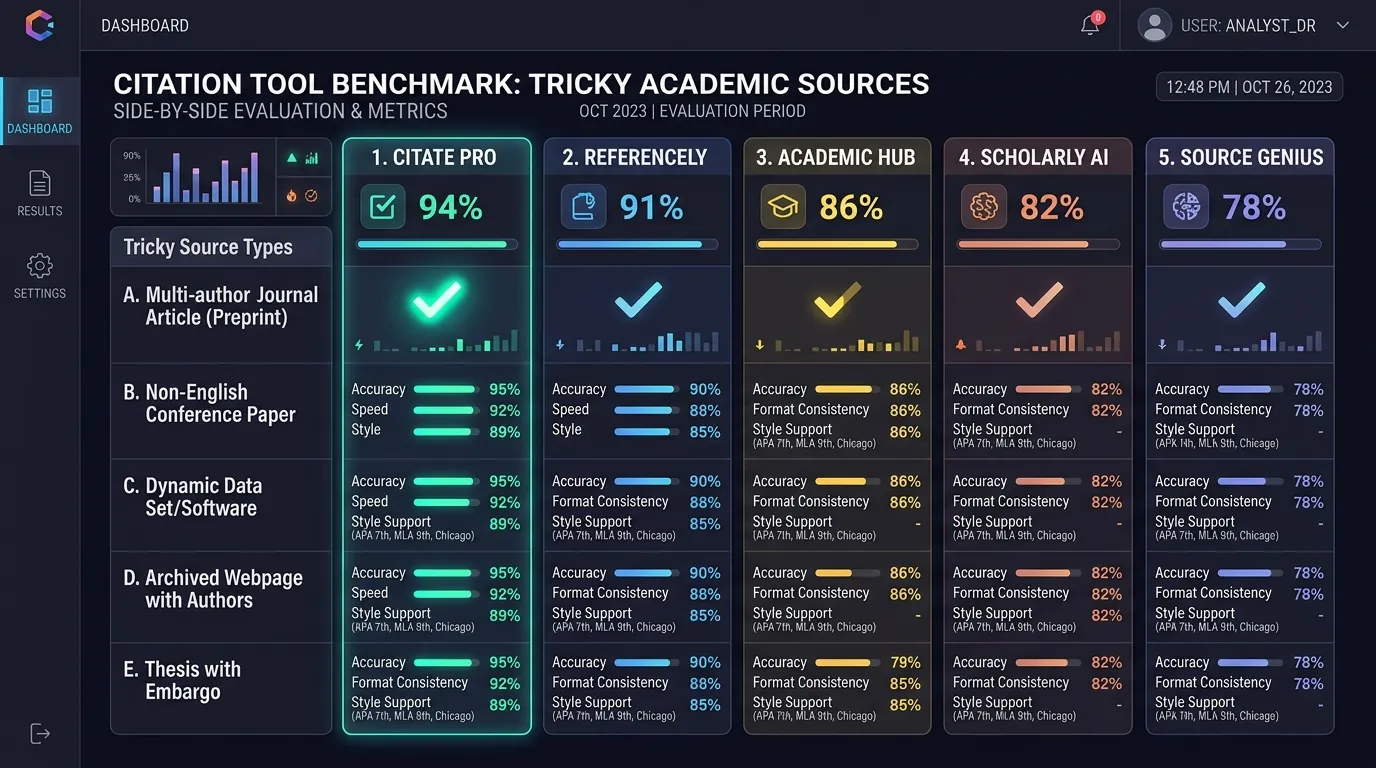
Citation generators promise speed. But are they accurate? The only honest way to know is to test them side by side. This guide shows you how to compare MLA citation generators using the same tricky sources. You’ll learn what to score, where tools usually stumble, and how to decide which MLA citation generator is accurate enough for your paper. Think of it as a road test before you buy the car.
What Should You Compare When Testing MLA Citation Generators?
Start with accuracy, not looks. A neat entry can still hide wrong facts. So compare the author, title, container, date, and location in every result. This is the heart of fair citation generator testing.
Next, look at features. Does the tool follow MLA 9? Does it offer many source types? Can you edit fields easily? The table below gives you a simple scoring method for any citation tool evaluation.
| Test Area | What to Check | Points |
|---|---|---|
| Author | Name order, group authors, missing names | 0–2 |
| Title | Title case, full subtitle | 0–2 |
| Container and publisher | Correct and not mixed up | 0–2 |
| Date | Day, month, year order | 0–2 |
| Location | DOI or clean web address | 0–2 |
| MLA 9 rules | No “n.d.,” “Web.,” or “Print.” | 0–2 |
How Did the Five Tools Handle Straightforward Book Sources?
Books are the warm-up round. Most tools pull book data from ISBN records. Those records are usually clean. So citation generator accuracy tends to be highest here.
Still, small slips can sneak in. A tool may drop a subtitle. Another may pick the wrong edition or a reprint year. So even an easy book source test needs a quick check against the title page. Never skip it just because the entry looks tidy.
Which Citation Details Became Difficult With Complex Websites?
Websites are the hard round. Here, source parsing depends on the page’s hidden code. Some sites tag authors clearly. Others tag nothing at all. As a result, tools often grab the site name as the author.
Update dates cause trouble too. So do long web addresses packed with tracking codes. In most comparisons, the website source test shows the widest gaps between tools. This is where automated citations need the most human help.
Testing Citation Generators With Difficult Sources
Choose sources that push tools to their limits. Use a news story with an update date, a government report, and an online video. Add a database article with a DOI. This mix lets you test citation generators with difficult sources fairly. Every tool faces the same obstacle course.
How Did Each Generator Process Sources With Multiple Contributors?
Extra names confuse many tools. Editors, translators, and co-authors often get mixed together. One tool may list every name as an author. Another may forget the translator completely.
MLA has clear rules here. Two authors appear in full. Three or more use the first name plus “et al.” Editors and translators follow the title with a short label. A strong multi-author source test checks each rule. It helps you identify citation generator errors quickly.
What Happened When the Same Source Produced Different Citation Results?
This surprises many students. Paste one web address into five tools, and you may get five different entries. One lists the site as the author. Another skips the date. A third keeps the full web prefix.
Why does this happen? Each citation algorithm reads source metadata in its own way. Some trust page tags. Others trust search data. That’s why a citation output comparison is so revealing. It shows exactly how citation generators differ on identical input.
How Can You Evaluate Citation Completeness Without Relying on Appearance?
Don’t let formatting fool you. Italics and hanging indents can look perfect while the facts are wrong. Instead, check each core element against the original source.
Track two things separately. First, count what’s missing. Second, count what’s wrong. A blank field is often safer than a false one. This split gives a fairer citation quality assessment and helps you evaluate citation output honestly.
What Kinds of Tricky Sources Expose Weaknesses in Citation Generators?
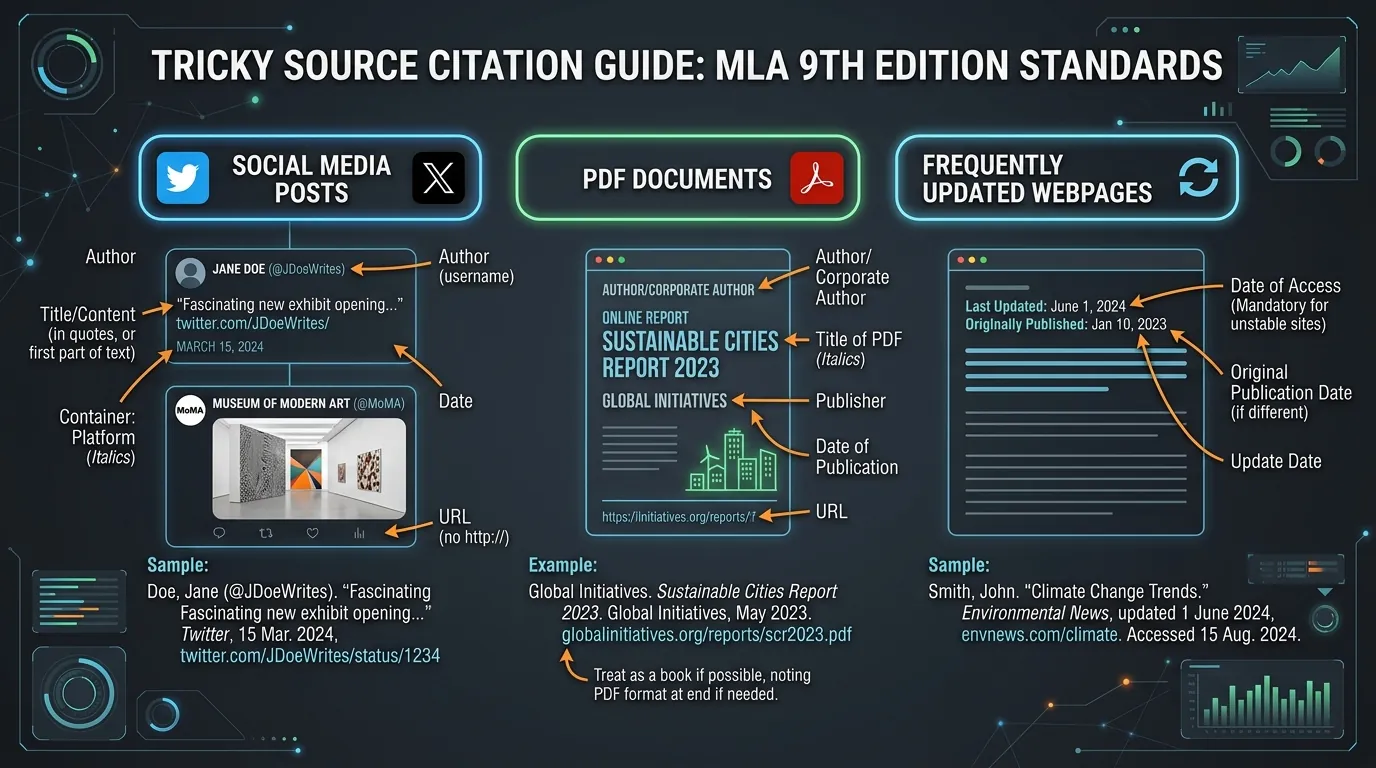
Some sources trip up almost every tool. Social media posts are a classic example. PDFs without metadata are another. Pages behind logins and reposted articles also cause errors.
Newer sources add fresh challenges. Many tools still lack a clear template for AI chatbot responses. The table below lists strong choices for tricky source citation tests.
| Tricky Source | Common Weakness It Reveals |
|---|---|
| News article with an update date | Wrong date chosen |
| Government PDF report | Agency shown as both author and publisher |
| Database journal article | Missing volume, issue, or DOI |
| Organization video | Platform listed as author |
| Translated, edited book | Contributors mixed up |
| Social media post | Username handled poorly |
How Do Automated Tools Handle Missing or Ambiguous Metadata?
When data is missing, tools act very differently. Some leave the field blank. Others fill gaps with odd guesses like “Anonymous.” A few still add “n.d.,” which MLA 9 doesn’t use.
A missing metadata test shows which tools stay honest. The most trustworthy tools leave out what they can’t find. They never invent details. That behavior is a clear sign of citation generator reliability.
What Manual Corrections May Still Be Necessary After Generation?
Nearly every generated entry needs a final touch. You may need to fix title case or author order. You might remove tracking codes or add an access date.
Case study: Picture a sophomore comparing five entries for one journal article. Only one tool lists the correct volume number. She opens the database record and fixes the other four. Tracking your citation correction rate this way shows how much time each tool truly saves.
Comparing Generated Works Cited Entries Side by Side
Paste all results into one document. Line them up element by element. Then highlight each error in a different color. This visual trick helps you compare generated Works Cited entries fast. It also makes your citation result analysis easy to share with classmates.
Conclusion
No citation tool is perfect. The best choice depends on the sources you use most. A book-heavy paper may suit one tool, while a web-heavy paper suits another. Score each tool fairly, and count errors rather than admiring layouts. Most importantly, check every result against the original source. A careful MLA citation generator comparison helps you review MLA citation tools wisely and save time without losing accuracy.